 New


Modelo 210 predeclaración: filing it yourself, with or without Cl@ve
You can file your own return for free, even from abroad and without any Spanish electronic ID. Here is how: the Modelo 210 predeclaración if you have neither Cl@ve nor a certificate, online filing if you do, how to get either from abroad, how each is paid and the proof to keep.
By the CasitaTax team · Updated November 3, 2026 · 11 min read

In short
 No Cl@ve, no certificate: fill in the predeclaración on the Agencia Tributaria's website, print it, then pay it by transfer from your bank abroad, or at a Spanish bank. No NIE needed: the form gives you a code.
- Online: with Cl@ve, a Spanish digital certificate or, for EU citizens, their own country's eID (eIDAS). Cl@ve and the certificate need an NIE; eIDAS also takes the code a first predeclaración gives you.
- From abroad: Cl@ve comes by an invitation letter posted to your tax address, or at an office in Spain; the certificate at a Spanish career consulate. Video sign-up is only for Spanish ID cards.
- A transfer from abroad carries the payment ID alone, within 30 days, and the return only counts as filed once the money arrives.
On this page
Can you file Modelo 210 yourself?
Yes, and it costs nothing: the Agencia Tributaria's forms are free, and you need neither a Spanish address nor a Spanish bank. There are two routes, and the one you take depends on whether you can identify yourself online.
- The predeclaración (paper route): you fill in the same online form without logging in, print the PDF it makes, then pay it or hand it in. It needs no electronic ID.
- Online filing: you log in with Cl@ve, a digital certificate, a Spanish electronic ID card or eIDAS, fill in the form, choose how to pay, and file it on the Agencia Tributaria's website.
Either way, for a home you own you are the one filing: your name goes in the box of the person filing the return, even if someone else sends it for you. What goes in each box is in our Modelo 210 form in English, box by box.
Which route fits you?
The one your documents allow today. Most owners abroad start with the predeclaración, then move online once they have Cl@ve or a certificate.
No NIE, no electronic ID
- Your route
- Predeclaración
- What it takes
- An e-mail address: the form gives you an identification code (NIF M)
An NIE, no Cl@ve or certificate yet
- Your route
- Predeclaración this year
- What it takes
- Then Cl@ve by letter or in person, or a certificate at a Spanish consulate, for next year
Cl@ve or a Spanish digital certificate
- Your route
- Online
- What it takes
- Your NIE, and a way to pay: direct debit, the tax office's payment gateway or a transfer
An EU national eID
- Your route
- Online, through eIDAS
- What it takes
- An NIE, or the NIF M code of a first predeclaración
| You have | Your route | What it takes |
|---|---|---|
| No NIE, no electronic ID | Predeclaración | An e-mail address: the form gives you an identification code (NIF M) |
| An NIE, no Cl@ve or certificate yet | Predeclaración this year | Then Cl@ve by letter or in person, or a certificate at a Spanish consulate, for next year |
| Cl@ve or a Spanish digital certificate | Online | Your NIE, and a way to pay: direct debit, the tax office's payment gateway or a transfer |
| An EU national eID | Online, through eIDAS | An NIE, or the NIF M code of a first predeclaración |
How do you fill in the Modelo 210 predeclaración?
On the Agencia Tributaria's website, without logging in: open the form "Modelo 210. Formulario para su presentación (predeclaración)", fill it in, and generate the PDF.
- 1Work out the tax first: the free non-resident tax in Spain simulator gives you the figures for a home you don't rent out.
- 2Open the predeclaración form in the Agencia Tributaria's Sede electrónica. Fields with an asterisk are mandatory; the tax office asks you to pay special attention to the Devengo block, the dates.
- 3No NIE? Next to the NIF field, a button gives you an identification code: you enter an e-mail address, your details and address, then the 8-character key sent by e-mail. Keep the code (it starts with M): it is your number for every later return.
- 4Press Validar declaración until it says there are no errors ("Ir al Error" takes you to each one), then choose how you pay or where a refund goes.
- 5Export the .210 file if you want to reload the return later, then press Generar predeclaración.
- 6Print the PDF, write your NIF (or code) on every copy of the payment page and sign them by hand. Then pay or hand it in, as its instructions say.
Good to know
If the code button returns an error, or says a taxpayer with your details already exists, the code was probably assigned: look for the e-mail "Comunicación del Código de Identificación de no residente asignado" before asking for another.
How do you pay a predeclaración from abroad?
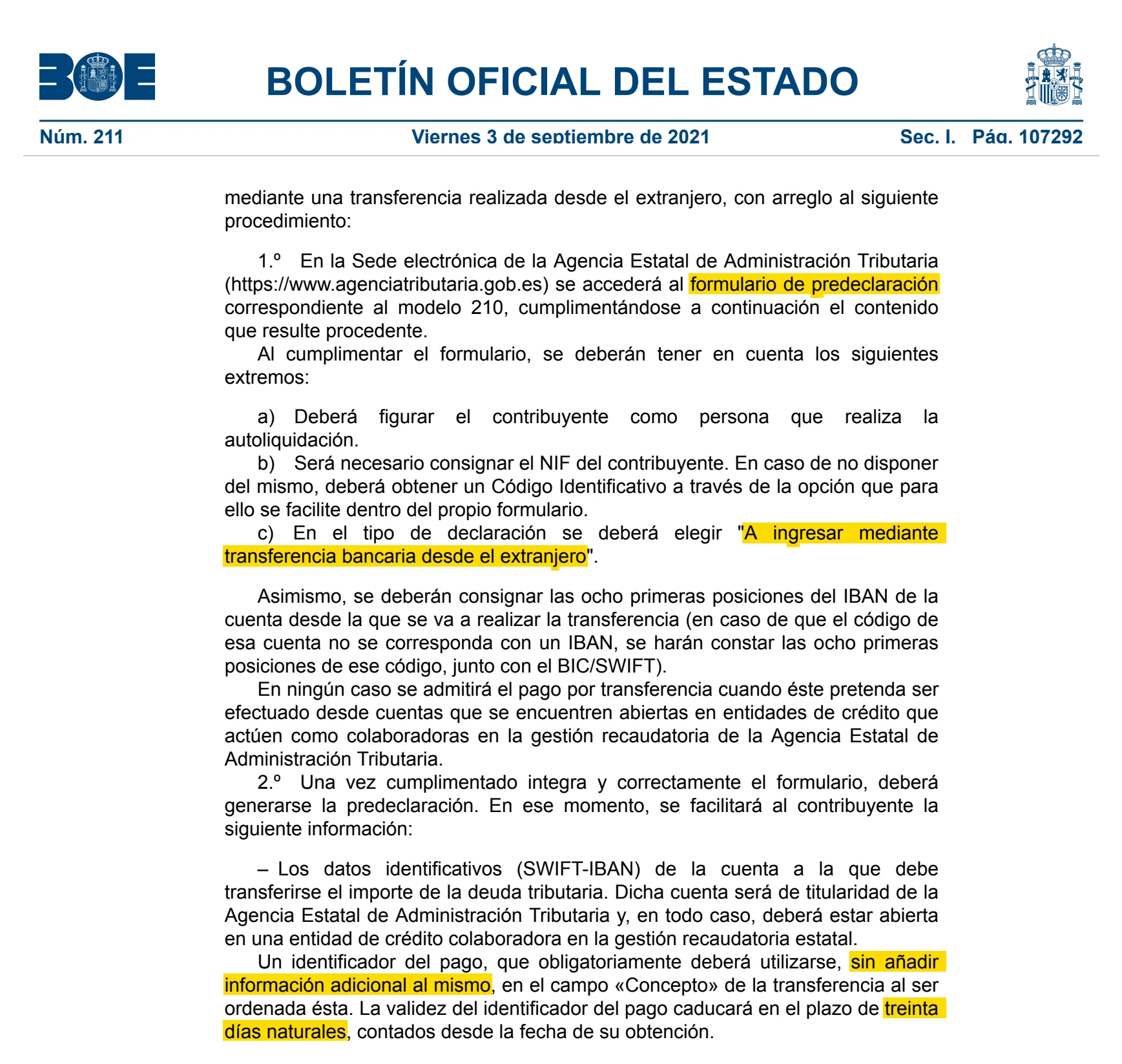
By bank transfer from your account abroad: choose "A ingresar mediante transferencia bancaria desde el extranjero" in the form, give the first eight characters of your IBAN, and the PDF gives you the tax office's account and a payment ID.
- The ID alone in the transfer's reference field: nothing else, not your name, not your NIF. A transfer without it, or with it incomplete, is sent back.
- Within 30 days: the money must reach the tax office within 30 calendar days of generating the predeclaración. After that the ID expires and the transfer is sent back, its charges at your cost: send it early.
- In euros, not pounds or kronor: the Agencia Tributaria sends back transfers in other currencies. And from a bank that isn't one of its collaborating banks in Spain; from an account at one of those, pay at the bank instead.
- Filed when the money arrives: the return only counts as filed on the day the money reaches the tax office's account. Send it days before the deadline.
- For owners filing their own return: the owner must be the person filing. If your return needs documents (a tax residence certificate, for example), post them with the payment page's copy for the administration to the Oficina Nacional de Gestión Tributaria, by ordinary post.
If you have a Spanish account at a collaborating bank, take the printed predeclaración to it, or pay through its online banking: the payment files the return. When each return is due, and what a direct debit changes: our guide to the Modelo 210 deadline.
Where does a predeclaración with a refund or zero tax go?
To the tax office, on paper: there is nothing to pay, so no bank files it for you. Send the payment page's copy for the administration, signed, with any documents to attach, in person or by registered post.
- To the Oficina Nacional de Gestión Tributaria (Registro General, Calle Lérida 32–34, 28020 Madrid) if you filed it yourself with the code the form gave you, and named no representative or address in Spain.
- Otherwise, to the tax office in charge of your return: the PDF's instructions say where to file.
- A refund can go to an account abroad, in your own name.
A sale at a loss is the usual case: the return is how you get back the 3% the buyer withheld.
How do you get Cl@ve as a non-resident?
With an NIE, by an invitation letter or at an office in Spain: Cl@ve is the Spanish administration's login, and the Agencia Tributaria accepts its basic level for Modelo 210.
- By letter: start the registration on the Agencia Tributaria's website with your NIE and the support number printed on your NIE document, and ask for the invitation letter. It goes by post to the tax address the tax office holds for you. Once it arrives, you have 60 days to finish with the code it carries.
- In person: by appointment at a tax office in Spain, with your NIE and your passport. Nobody can go for you.
- Your phone: a foreign mobile number works, with its country code. You then log in with the Cl@ve app or a PIN sent by SMS.
Watch out
Signing up by video is only open to Spanish citizens with a Spanish ID card for now: with an NIE, it is the letter or the office.
Can you get a Spanish digital certificate from abroad?
Yes, at a Spanish career consulate (not an honorary one), if you have an NIE: the certificate of the Fábrica Nacional de Moneda y Timbre (FNMT) is free, and its identity check can be done at a Spanish consular office abroad as well as at offices in Spain. Ask the consulate first how it books the identity check.
- 1Request it on the FNMT's website with your NIE: you get a request code by e-mail.
- 2Prove your identity in person at a Spanish consulate, or at an accreditation office in Spain (tax offices ask for an appointment): bring the code, your NIE document (or the official letter granting it) and your passport.
- 3Download the certificate on the same computer, with the same user account, you used for the request, and make a backup copy right away.
Getting it by video needs a Spanish electronic ID card. Someone else can go to the office for you only with your signature certified by a notary.
Can you log in with your own country's eID?
Yes if you are an EU citizen with a national eID connected to eIDAS, the European system: choose "Acceso ciudadanos UE (eIDAS)" when you log in, pick your country and log in as you do at home.
The first time, you enter your Spanish number once: an NIE, or the NIF M code a first predeclaración gave you. The Agencia Tributaria opens eIDAS to citizens of EU countries, for its main procedures, non-resident tax returns among them (for some, only the most recent years). It asks for an NIE or an NIF M code, so the code of a first predeclaración should be enough: that is our reading of its help pages, not a rule they state.
We file your Modelo 210
 Every owner, every year
- You approve before we file
- 100% online
How do you file Modelo 210 online?
Log in to the Modelo 210 form in the Agencia Tributaria's Sede electrónica, fill it in, choose how to pay, then sign and send: the receipt appears on screen.
- 1Log in with Cl@ve, your certificate, a Spanish electronic ID card or eIDAS.
- 2Fill in the form as on paper. Guardar keeps a draft on the tax office's servers, which Cargar reloads (one draft per NIF: saving again replaces it); the virtual assistant (ADI) answers questions, bottom right.
- 3Press Validar declaración, fix what it lists, then Formalizar Ingreso / Devolución.
- 4Choose how you pay, or where a refund goes (an account in Spain or abroad).
- 5Press Firmar y enviar, tick Conforme, and send. "Su presentación ha sido realizada con éxito" means it is filed.
- Direct debit, from an account in Spain or anywhere in the SEPA zone (the United Kingdom and Switzerland included), within its window: until December 23 for a home not rented out, April 15 for rent, never after a sale. The account must be in your name, or the filer's.
- Card or Spanish bank: pay first through the tax office's payment gateway ("Realizar pago"), by card or from an account at a collaborating bank, or through your Spanish bank; either gives you a 22-character payment number (NRC), which you enter to file the same day. The gateway asks for a certificate, a Spanish electronic ID card or Cl@ve Móvil, and the tax office doesn't say whether foreign cards work.
- Transfer from abroad: choose "Reconocimiento de deuda y pago por transferencia". The return is filed when you send it; you then pay with a payment ID valid 30 days, in euros, and the payment counts on the day the money reaches the tax office: it must arrive by the deadline.
What proof of filing do you keep?
The receipt with its CSV: online, the tax office returns a PDF with the registration number, a 16-character secure verification code (CSV), the receipt number, the date and time, then the whole return. The order says to print and keep it.
- Predeclaración paid by transfer: keep the PDF and your bank's transfer confirmation. Once the money has arrived, a payment receipt can be downloaded from the Sede electrónica, but only once you can identify yourself there. Without an electronic ID, the PDF and your bank's confirmation are your proof.
- Your number: note the NIF M code if you got one, and the .210 file, which reloads that return into the form.
- How long: the tax office generally has four years to check a return, counted from the end of its window: keep everything at least that long.
Can someone else file it for you?
Yes: a gestoría or adviser registered to file for others, or anyone you give a power of attorney for this return, files online with their own certificate. You still appear as the person filing.
That is what we do: we file your Modelo 210 from the details of your home, you pay the tax to the Agencia Tributaria, and you get the receipt.
How we checked this guide
We read the official texts below and update this guide whenever the rules change. It is general information, not advice on your own situation.
- Orden EHA/3316/2010, modelos 210, 211 y 213 (texto consolidado: arts. 10 a 14) — read on November 2, 2026
- Orden HFP/915/2021 (BOE-A-2021-14453): presentación sin certificado con pago desde el extranjero — read on November 2, 2026
- Agencia Tributaria, formas de presentación y pago del modelo 210 — read on November 2, 2026
- Agencia Tributaria, formulario del modelo 210 para presentación en papel (predeclaración) — read on November 2, 2026
- Agencia Tributaria, presentación electrónica del modelo 210 — read on November 2, 2026
- Agencia Tributaria, registro en Cl@ve por internet con carta de invitación — read on November 2, 2026
- Agencia Tributaria, registro presencial en Cl@ve — read on November 2, 2026
- Agencia Tributaria, cómo autenticarte con el sistema eIDAS — read on November 2, 2026
- FNMT, certificado de ciudadano: acreditación presencial — read on November 2, 2026


